Help & How to Play
Your first hand, your first table with friends, and everything in between.
Learn the table
What is everything on my screen?

Wall is how many tiles are left to draw; when it reaches zero with no winner, nobody wins that hand. CARD pulls the card down over the table. MENU has the settings, your saved hands, and help.

The other players. Anything they've called sits face up under their name. Dinah is showing a pung of 5 Craks with a joker in it. The small E marks East, the dealer.
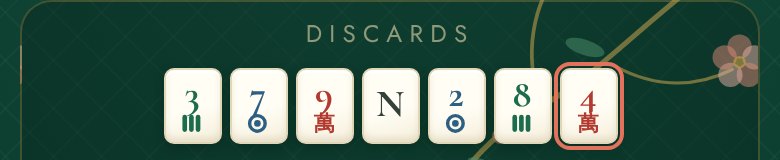
Discards. Every tile anyone has thrown, in order. The newest is ringed in coral. That's the one you can call, if the call is legal.

HINT names the hands you're closest to and rings the tiles that belong to them. SORT tidies your rack by suit.
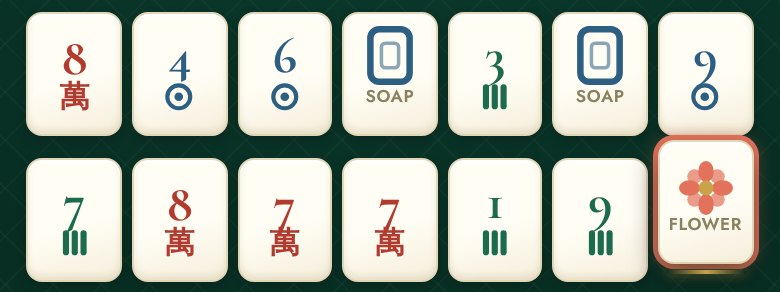
Your rack. Thirteen tiles, fourteen after you draw. Tap one to lift it; tap it again to put it back.

DISCARD throws the lifted tile. That ends your turn. The line above it tells you whose turn it is and what just happened.
What does each tile look like?
- BamsThe bamboos, 1 to 9, in green. The 1 Bam is a bird.
- CraksThe characters, 1 to 9, in red. The number is on top.
- DotsThe circles, 1 to 9, in blue.
- WindsNorth, East, West, South. Four of each.
- DragonsRed, Green, and the white one everybody calls Soap. It can stand for zero.
- FlowersEight in the set, all interchangeable.
- JokersGold, with a green J and the word JOKER — the one face-up tile that isn’t cream, so it’s easy to spot in a rack or a pile. A joker stands in for any tile in a group of three or more, never in a pair or a single. A thrown joker is dead: nobody can call it.
- Face downGreen with a gold frame. Tiles nobody can see yet: the wall, and other players' racks.
What happens on my turn?
How do I put my tiles in order?
You can sort automatically with the SORT button, or arrange them by hand.
The SORT button
Tap SORT and the rack arranges itself: Craks, then Bams, then Dots, low to high, with winds, dragons and flowers at the end. Matching tiles land side by side, so a pair or a pung is easy to see.
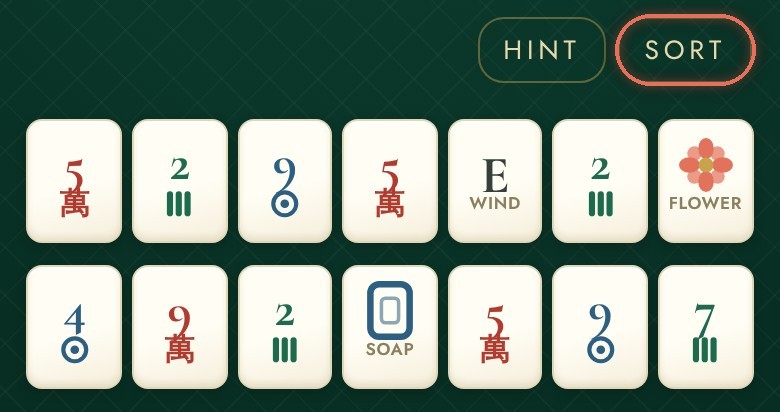
Before: the tiles as they arrived. SORT is the ringed button.
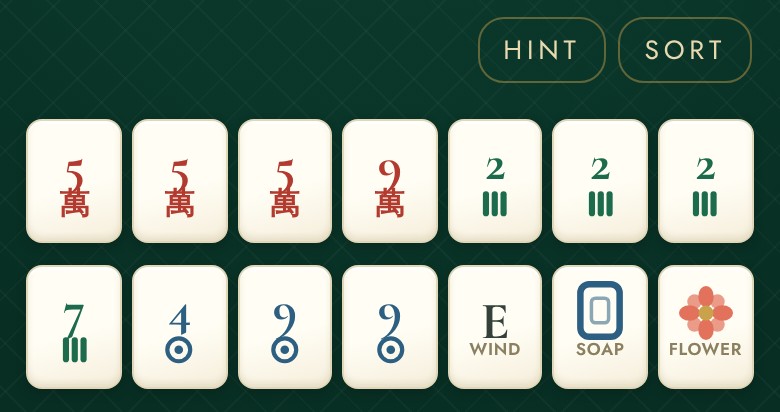
After one tap of SORT: grouped by suit, low to high.
With the hint on, SORT arranges differently: the tiles the hint wants you to keep go to the left, jokers in the middle, and everything you could throw to the right. SORT works once per tap. A tile you draw lands at the right-hand end, so tap SORT again whenever you like.
Sort by hand
Press a tile and move your finger sideways; it lifts and follows you, and it drops into whatever gap you let go over. You can slide between the two rows.
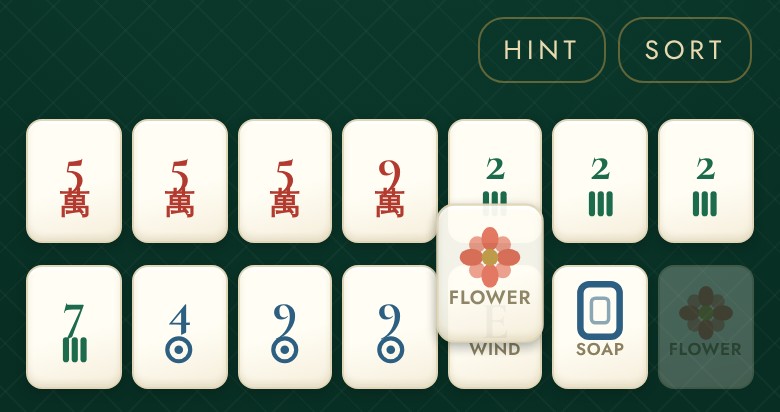
Sliding the Flower to a new spot.
A tap lifts a tile to throw it; a sideways slide moves it. If you only mean to select a tile, keep your finger still.
↑ Back to the questionsLearn the game
How does the Charleston work?
Before anyone draws, players trade tiles three at a time, in a set order. The names above the board are the players to your left, across and right.
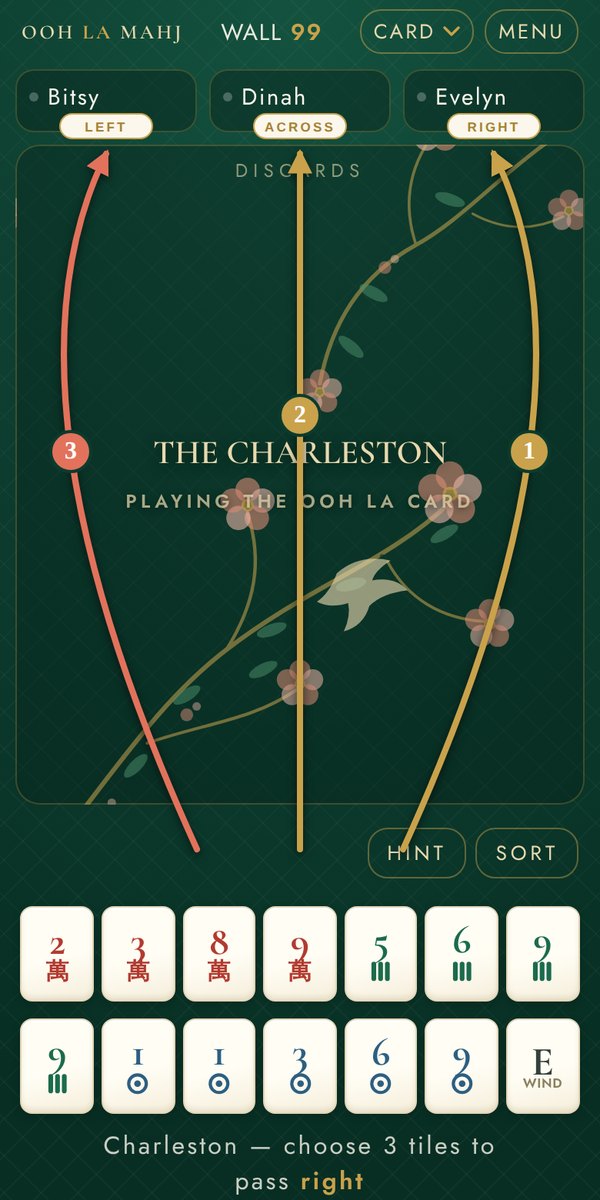
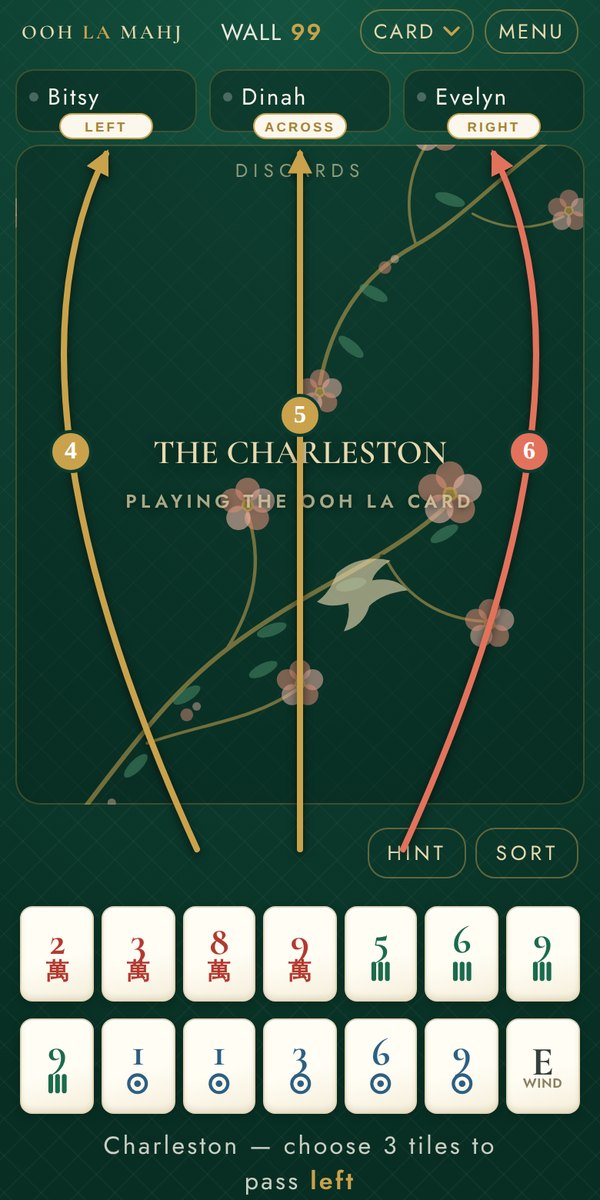
Tap three tiles and PASS; the app keeps the order and the count for you. Jokers can't be passed. Solo, you can shorten it to one round: MENU › TABLE SETTINGS › CHARLESTON › EXPRESS.
The whole Charleston, step by step, with a dealt rack to practise on.
↑ Back to the questionsWhat do the gold rings mean?
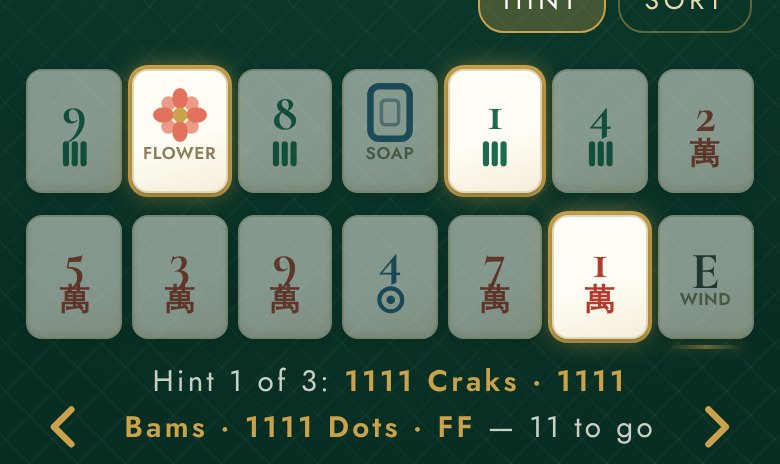
Tap HINT and the app names the hand on the card you're closest to, and how many tiles you still need. The gold rings mark the tiles in your rack that belong to that hand. Those are the ones to keep. The dimmed tiles aren't part of it; if you're throwing something, throw one of those. The arrows cycle through your three closest hands.
The hint is advice, not a rule: it never throws for you and it never stops you throwing a ringed tile. "Closest" weighs how hard each missing tile is to get, not just how many; the small print is just below. Hints are on by default in solo play; tap HINT again to turn them off. At a friends table the host decides for everyone.
How the hint decides
The number beside a line is a plain count of tiles still needed. The order is about how hard those tiles are to get.
Some missing tiles are easier than others
A tile missing from a group of three or more can be drawn, called when someone throws it, or replaced by a joker. A tile missing from a pair or a single has one way in: you draw that exact tile yourself. So a gap in a pair counts as roughly twice the work of a gap in a group. Two hands can both say "4 to go" and one be much harder.
The jokers in your rack already count
A joker you hold is a group slot already filled, so it comes off the tally before anything is ranked. Jokers do nothing for pairs and singles, which is why those hands stay expensive however many you're holding.
What's still out there breaks the tie
When two lines come out equally hard, the app looks at what's still in play: every copy of a tile not yet thrown, exposed, or in your rack. A line waiting on 6 Bams when three are face up on the table is a long shot; the better-supplied line goes first.
A hand that can't be finished drops out
If every copy of a tile a hand still needs is gone, that hand leaves the list, whatever its count said a moment ago. That's why a suggestion can change mid-hand. None of this overrules you: pin a line and everything is measured against yours.
How do I open the card, and pin a hand?
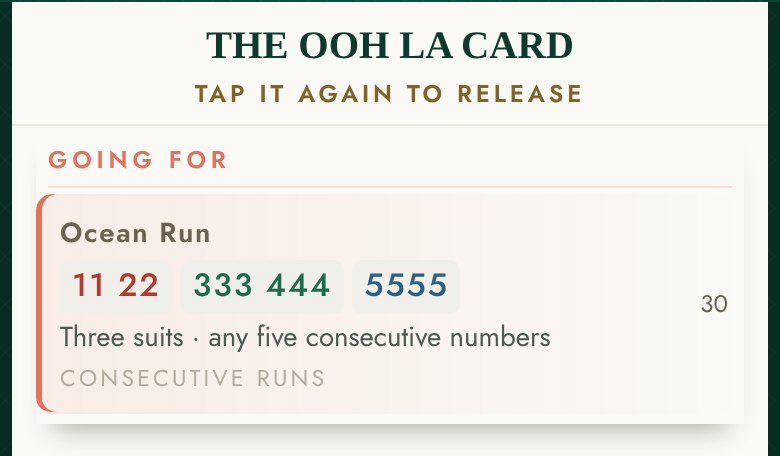
Every winning hand is a line on the card: fourteen tiles in a set pattern, in sections. Tap CARD at the top of the table to pull it down over your tiles; drag its handle to make it as tall as you like.
To pin a hand, tap its line. It lifts to the top under GOING FOR, and from then on the hint measures everything against the hand you chose instead of its own favourite. Tap the line again to release it. When you have hints on, the card also marks the hand the hint is currently naming.
How do I see the 2026 hands?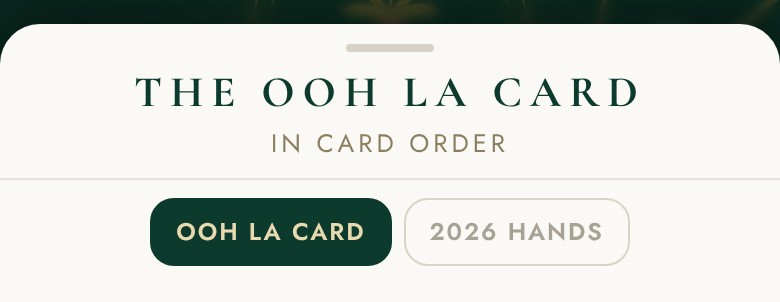
The switch at the top of the card sheet.
Two cards are in the app: our own Ooh La card, and the 2026 winning hands. Go to MENU › TABLE SETTINGS › THE CARD. The card opens as a full sheet with two buttons at the top. Tap 2026 HANDS and the card changes; tap OOH LA CARD to come back. Whichever is selected is the card your hands are scored against, in solo play and at tables you host. Ooh La Mahj is an independent app, not affiliated with or endorsed by the National Mah Jongg League.
↑ Back to the questionsWhen can I call a discard here?
You may call a tile someone throws only when it completes a group in your hand (a pung, kong, quint or sextet), or when it completes your mah jongg. You can't call for a pair or a single. The app checks this for you: if the offer doesn't appear, the call wasn't legal. You'll never be offered a tile you can't take.
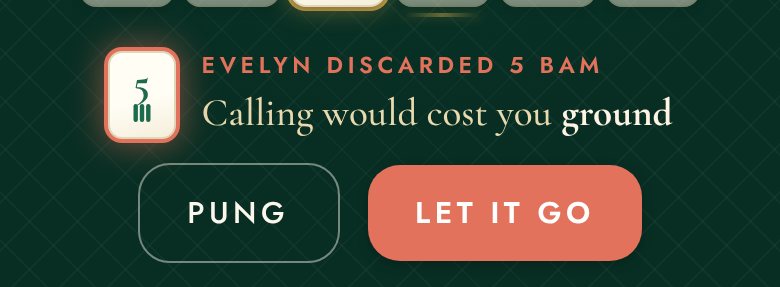
Hints on: the bar opens by itself and says what it thinks. The coral button is its advice.
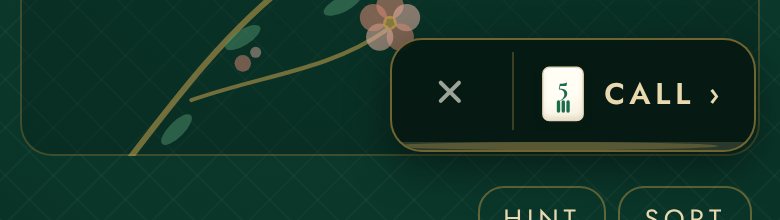
Hints off: a small CALL chip appears beside the pile. Tap it to see your options, or the × to let the tile go.
The plain bar: your legal calls, with no opinion. PUNG takes it; LET IT GO passes.
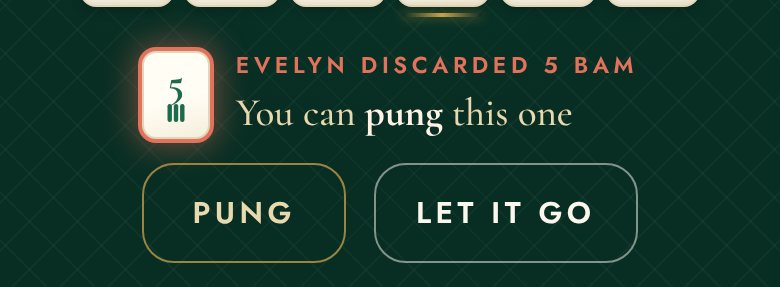
With hints on, the bar tells you whether the call helps the hand you're closest to: "Your hand needs a kong of 5 Bams", or "Calling would cost you ground". The coral button is the app's advice. The outlined one is the other choice, and it is always there. With hints off, there is no advice: a small CALL chip appears, and tapping it shows your legal calls. In solo play the bar waits as long as you like. At a friends table, if you do nothing the tile goes to whoever else wants it.
Calling ends the round of turns early: after you expose the group you throw a tile straight away, and play continues from you.
↑ Back to the questionsWhere do my exposed tiles go?
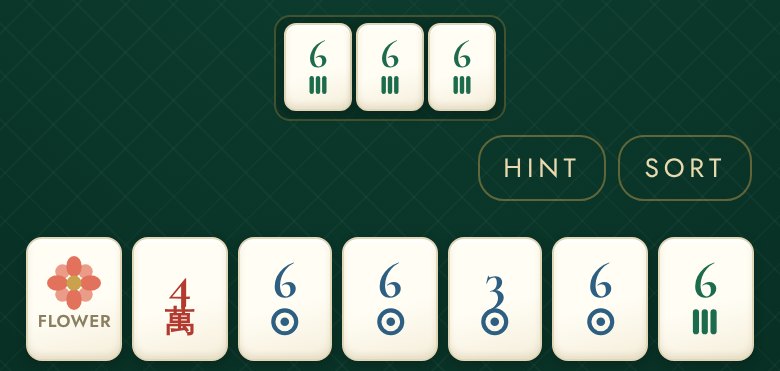
Yours sit face up in a row above your rack, under the pile. Other players' sit under their names at the top.
When you call a tile, the group leaves your rack and stays there for the rest of the hand. Three showing plus eleven in the rack is still fourteen. Once a group is exposed it can't come back and can't change, so you're committed to hands on the card that use it. Anyone holding the real tile can trade it for a joker in your exposed group; that's a joker exchange, and you can do the same to them with EXCHANGE JOKER.
↑ Back to the questionsPlay & troubleshoot
What can I change in settings?
- Text size — NORMAL, LARGE or LARGER, at the top of MENU. Tiles and buttons grow with it.
- The mat — four table colours, chosen with the swatches on the home screen: Jardin Vert, Jardin d'Aube (a light one), Midnight Aviary and Rosé Salon.
- Sound — on or off. MENU › TABLE SETTINGS for this and the four below.
- Bot difficulty — BREEZY (a forgiving table, generous discards), CLUB PLAYER (plays a solid game, misses a little; the default) or SHARK (defends, never misses a call).
- Pace — RELAXED or BRISK: how fast the bots take their turns.
- Charleston — FULL (all six passes and the courtesy) or EXPRESS (one round) for solo hands.
- The card — the Ooh La card or the 2026 winning hands. Switching mid-hand deals a fresh hand; the app asks first.
- House rules — how this table plays; open it from TABLE SETTINGS.
- Hints — the HINT button on the table itself, any time. At a friends table the host sets hints for everyone.
How do I play with friends?
Tap PLAY WITH FRIENDS on the home screen. A table seats four: you and three friends. Nobody needs an account or a download; a friend taps your link, types a name, and sits down. Bots fill any empty seat when you deal, and a friend who arrives late takes over a bot's seat.
Inviting your friends
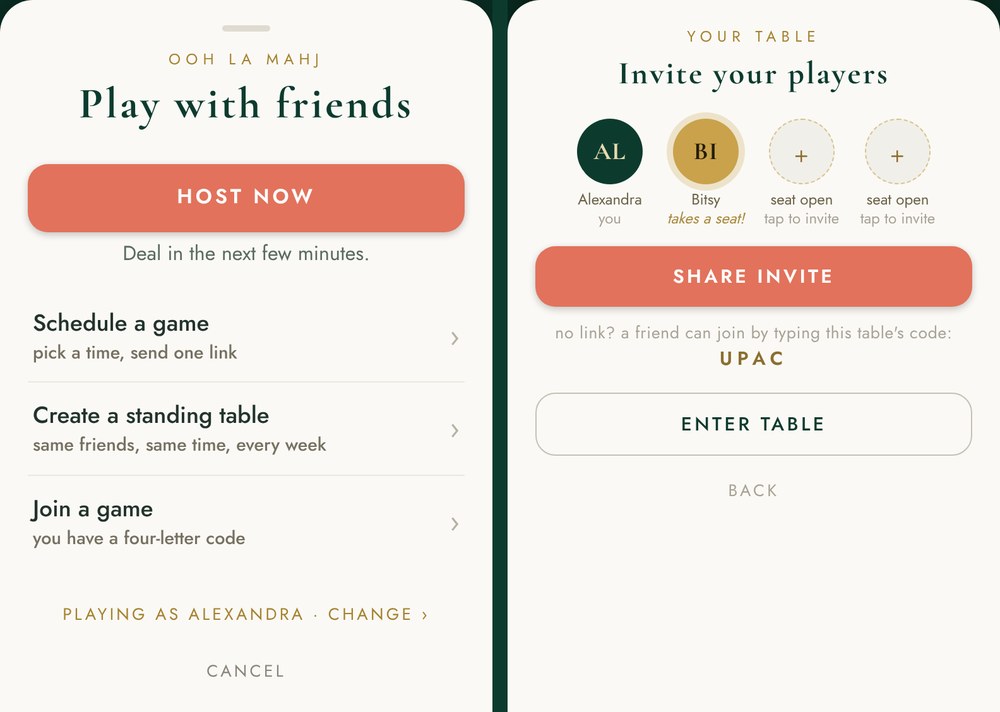
Left: the Play with friends sheet. Right: your table, with one friend seated and two seats still to fill.
Tap HOST NOW for a game in the next few minutes. Your table opens with four seat circles and a SHARE INVITE button, which hands your phone's share sheet a link: send it by text, email, or into any group thread. A friend without the link can type the table's four-letter code instead, under Join a game. Tap ENTER TABLE when you're ready. Only the host deals the first hand, and the START GAME button waits until you press it; your friends can still join after the deal.
Scheduling a game
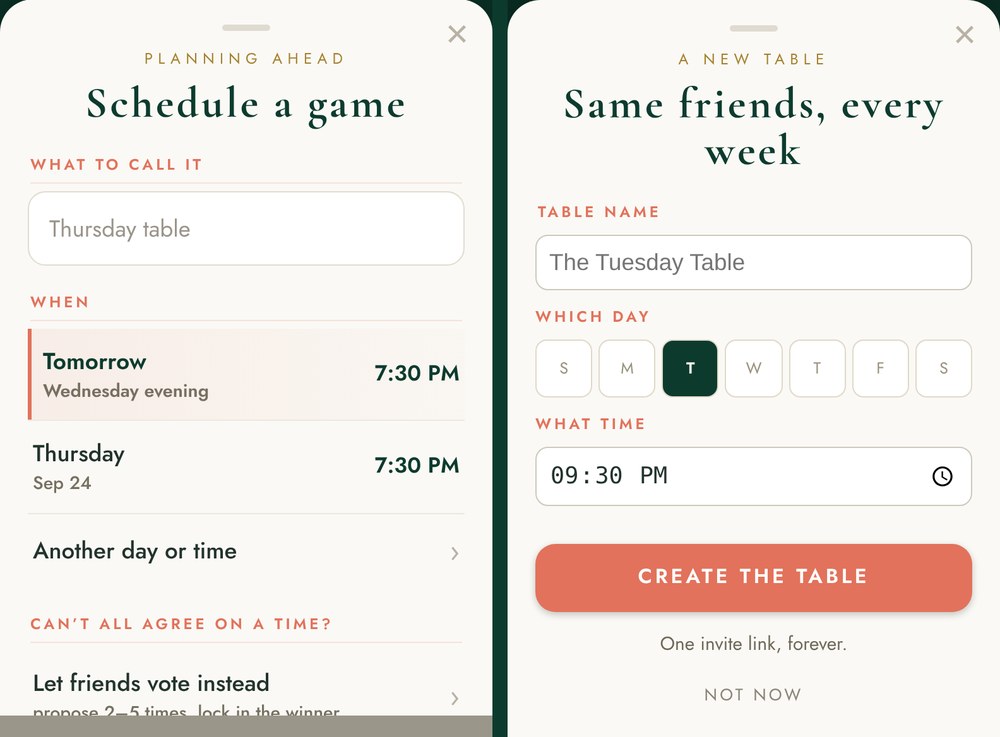
Schedule a game (left), or make it a standing table (right).
Schedule a game: give it a name, pick a time (tonight, tomorrow, or any day in the next few weeks) and tap CREATE. You get one link to send and an Add to my calendar row. The table opens an hour before game time; everyone taps TAKE MY SEAT and waits together, with chat open, until the deal.
Can't agree on a time? Choose Let friends vote instead: propose two to five times, your friends tick the ones that work, and you lock in the winner. Locking it in sends everyone the invite.
Standing table: same friends, same day and time every week, and one link that is theirs for good. If someone can't make a week, their seat stays theirs; a bot or a sub sits in for that week only.
Settings before and during the game
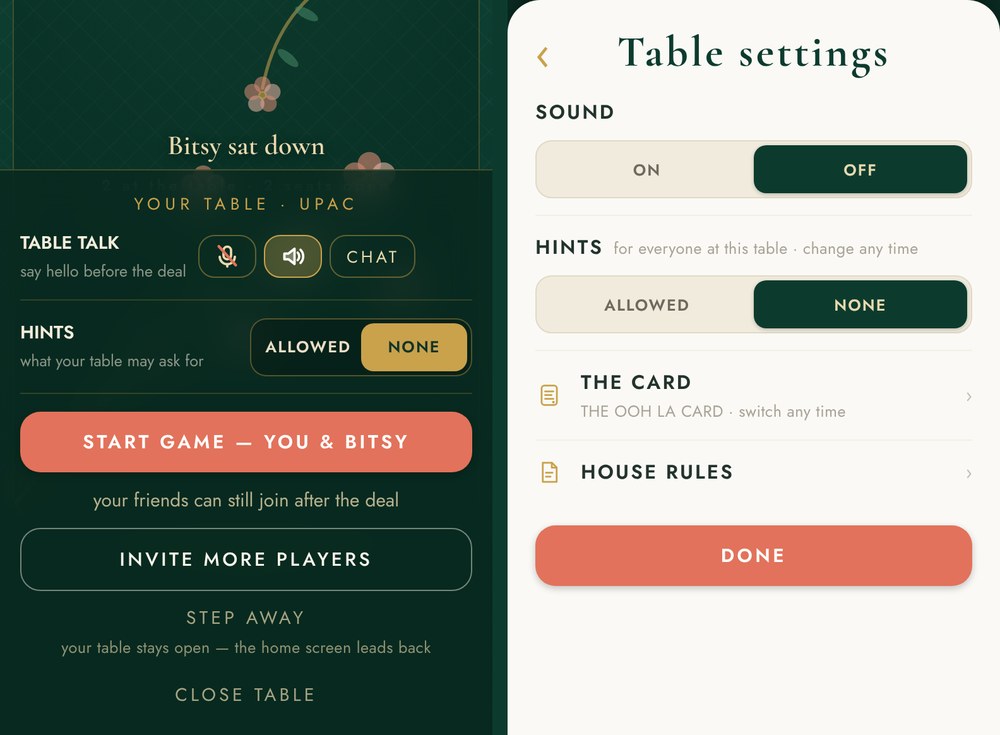
Before the deal, HINTS sits on the table itself (left). Once the hand is dealt, it lives in TABLE SETTINGS (right).
The host sets the table's rules and everyone plays by them. Hints start at NONE: switch them to ALLOWED on the table before you deal, or any time after at MENU › TABLE SETTINGS › HINTS. The card the table plays is the host's, and it is locked until the game ends. Friends tables play a full Charleston at a relaxed pace. Your friends see the same rules and can't change them.
Everything else is personal: text size, sound, the mat colour, and your own microphone and speaker. Each player sets those for themselves.
Chat and voice
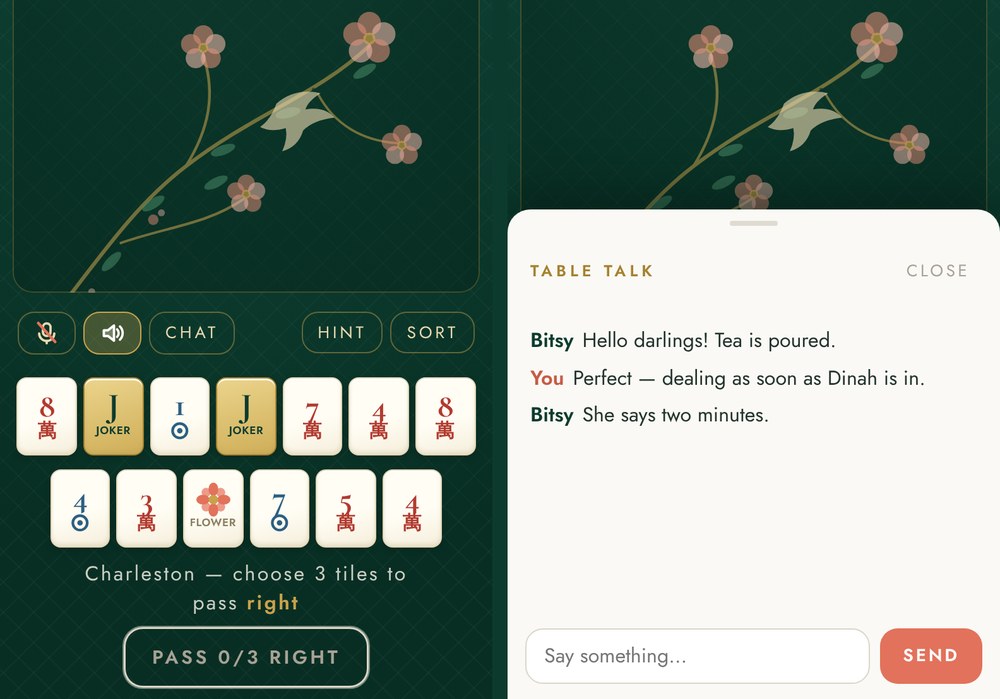
The microphone, speaker and CHAT sit at the left of the bar above your tiles. CHAT opens TABLE TALK.
As soon as a friend is at your table, three buttons appear above your rack: the microphone, the speaker and CHAT. They're there before the deal too, so you can say hello while you wait. Tap CHAT to open TABLE TALK: type, tap SEND, and the message pops up over the table for everyone; a badge on CHAT counts what you haven't read. Chat lasts as long as the table does.
Voice goes phone to phone and is never recorded. Your mic starts off: tap it to go live (your phone asks permission the first time) and tap again to mute. The speaker starts on; tap it to silence the table. If a friend's phone rings mid-hand, the table holds their seat: see below. If the mic won't answer, see Voice isn't working.
↑ Back to the questionsSomething not working?
Why can’t I call that tile?
Because the call wasn't legal: a tile can only be called to complete a group of three or more, or your mah jongg, never a pair or a single. If you're sure it should have been offered, tell us from MENU › HELP & ABOUT and say which tile.
What does “dead hand” mean?
Once you've exposed a group, you can only win with hands on the card that use it. If every tile those hands still need is gone (thrown, or showing on someone's rack), your hand can't be finished. The app tells you rather than letting you play on.
My friend’s phone rang mid-hand. Did they lose their seat?
No. The table pauses for them and says so. If they’re still gone after about a minute, the host is asked whether to keep waiting or let a bot play the seat for now. Either way the seat is theirs again the moment they come back.
Voice isn’t working
Voice goes phone to phone, so both people need the microphone allowed. Tap the microphone at the table. If your phone or browser has blocked it, the app tells you: allow the microphone in your phone’s Settings (on iPhone, Settings › Ooh La Mahj › Microphone) or in your browser’s site settings, then come back to the table. If the mic answers but nobody hears you, check you aren’t muted. CHAT works either way.
I didn’t receive my sign-in code
The code is six digits, works once, and lasts ten minutes. Check your junk folder and the spelling of the address, and ask for a new code if ten minutes have passed. Signing in is optional: you can play, and keep your hands on this device, without it.
Does the app work without an account?
Yes, everything does. Signing in with an email is optional; it carries your saved hands between devices, and between the website and the iPhone app.
↑ Back to the questionsSomething else?
I only have eleven tiles. Where did the others go?
Look above your rack. When you call a tile, the group goes face up there and stays. Three showing plus eleven in the rack is fourteen. Nothing is missing.
Do the gold rings tell me what to throw?
The other way round: they mark the tiles to keep, the ones that belong to the hand the hint is naming. The dimmed tiles are the ones you can spare.
Why is the hint suggesting a different hand than the one I'm going for?
HINT shows the three hands you're closest to, and "closest" weighs how hard each missing tile is to get, not just how many. If you've decided, open the card and pin your line; the hint then measures against yours.
Can I throw a joker?
Yes, but it's dead the moment it lands: nobody can call it. Better to keep them.
Can I stop the Charleston?
After the first three passes, anyone can. The second Charleston only happens if all four want it. The whole thing, step by step.
Where is my data?
Your hands and settings live on your device. If you sign in, your saved hands are kept on our server so they follow you. Voice never touches our servers; chat lasts as long as the table does. The privacy policy has the rest.
Tell us what happened
It comes straight to us. From inside the app, MENU › HELP & ABOUT › SOMETHING NOT RIGHT? does the same and attaches your build and screen for you.
↑ Back to the questions